随着大语言模型(LLM)的快速发展,如何让AI系统能够访问和处理大量外部知识成为了一个关键挑战。检索增强生成(Retrieval-Augmented Generation,RAG)技术应运而生,而LightRAG作为一个轻量级且高效的RAG系统,通过结合知识图谱和向量检索技术,为企业级知识管理和智能问答提供了优秀的解决方案。
LightRAG 简介
LightRAG是一个现代化的检索增强生成系统,专注于提供高质量的问答和知识管理功能。该系统最大的特点是将传统的向量检索与知识图谱技术相结合,实现了更精准和上下文相关的信息检索。
核心特性
- 轻量级设计:优化的架构设计,降低资源消耗
- 多模态支持:同时支持向量检索和图谱检索
- 多存储后端:兼容Neo4j、PostgreSQL、Faiss等多种存储系统
- 多模型支持:支持OpenAI、Hugging Face、Ollama等主流LLM
- 生产就绪:提供完整的API接口和Web UI界面
- 高并发处理:支持并发索引和查询操作
系统架构设计
LightRAG采用分层模块化架构,确保了系统的可扩展性和维护性。
整体架构
LightRAG的架构分为索引(Index)和检索(Retrieve)两个核心流程,采用双重存储策略实现知识图谱和向量检索的完美结合。
LightRAG索引架构流程图
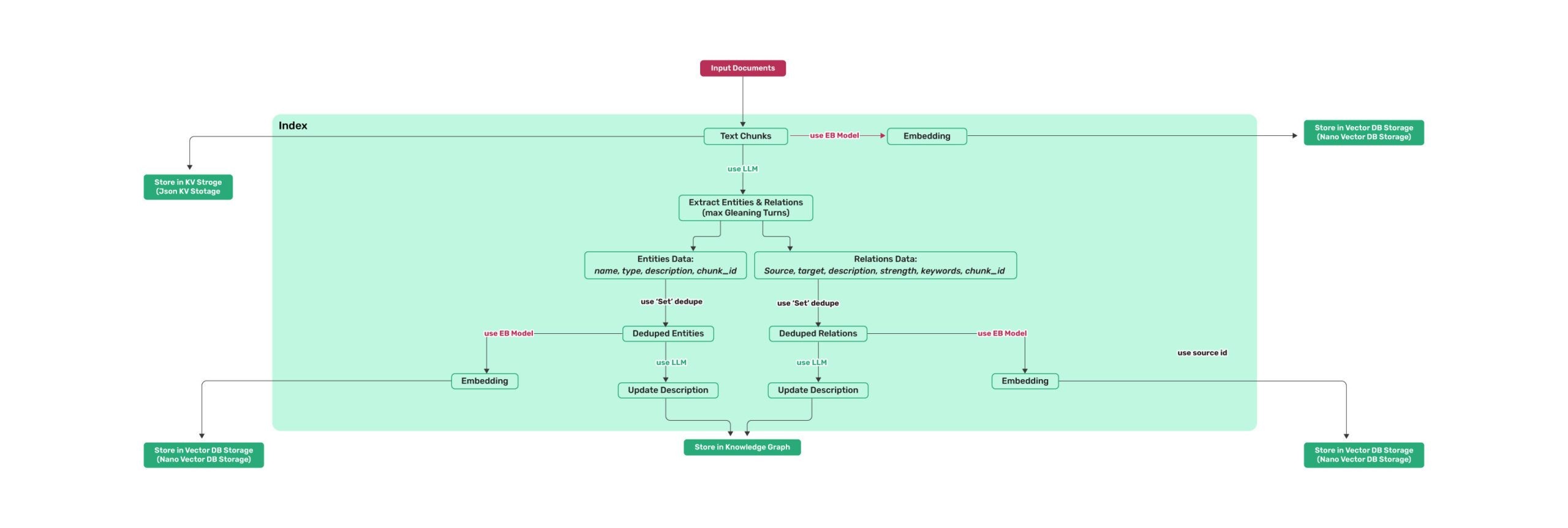
从索引流程图可以看到,LightRAG的索引过程包含以下关键步骤:
文档输入与分块
- Input Documents → Text Chunks
- 使用嵌入模型进行文本分块处理
并行处理管道
- 实体提取路径:Extract Entities & Relations → Entities Data → Deduped Entities → Update Description → Embedding
- 关系提取路径:Relations Data → Deduped Relations → Update Description → Embedding
- 向量嵌入路径:Text Chunks → Embedding
双重存储
- 知识图谱存储:Store in Knowledge Graph
- 向量数据库存储:Store in Vector DB Storage (Naive Vector DB Storage)
LightRAG检索与生成架构流程图
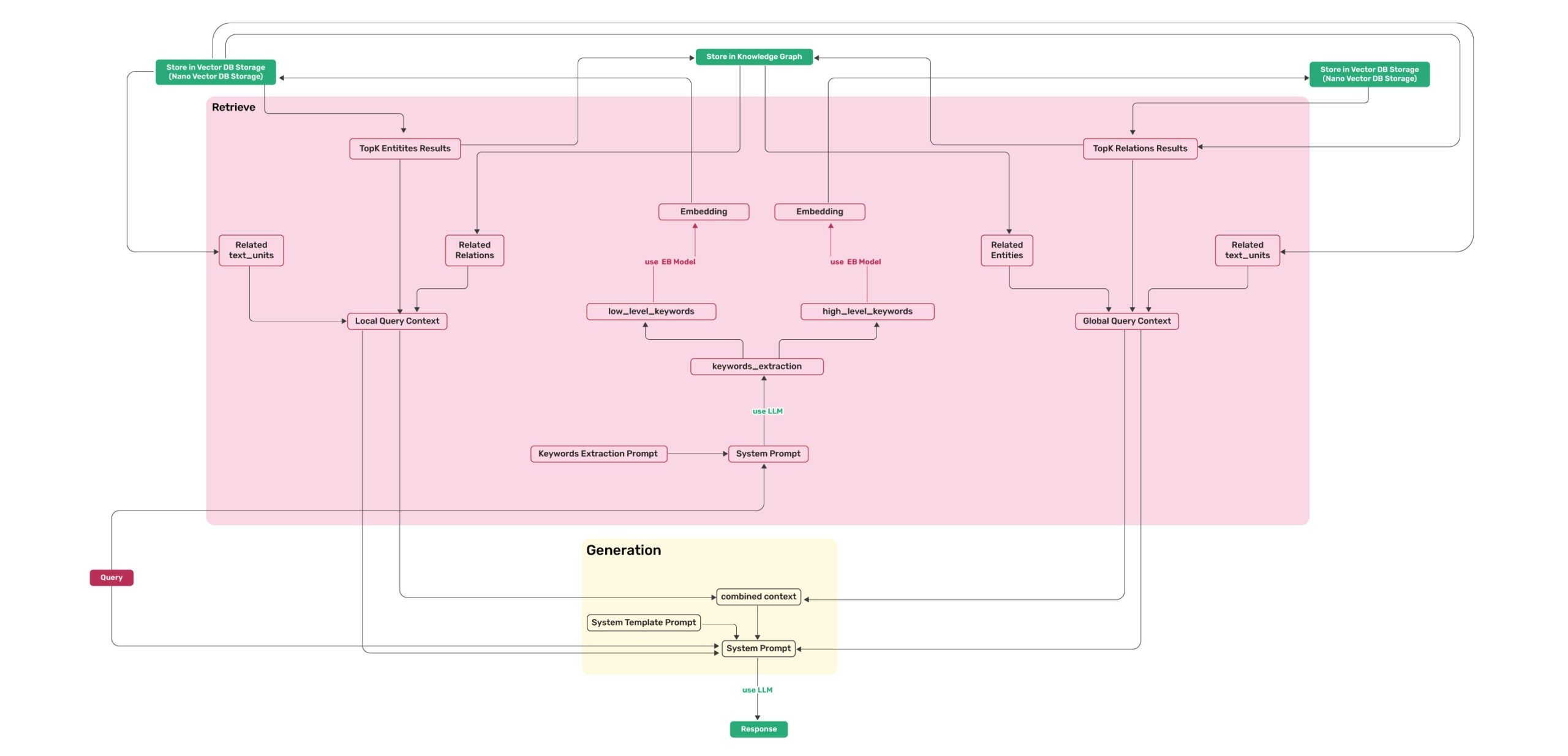
检索流程图展示了LightRAG如何处理查询并生成回答:
查询输入
双路径检索
- 左侧路径:Vector DB Storage → TopK Entities Results → Related text_units → Local Query Context
- 右侧路径:Knowledge Graph → TopK Relations Results → Related Entities → Related text_units → Global Query Context
上下文融合与关键词提取
- Local Query Context + Global Query Context → keywords_extraction
- 生成 low_level_keywords 和 high_level_keywords
- 使用嵌入模型进行关键词处理
最终生成
- combined context → System Template Prompt → System Prompt
- 使用LLM生成最终响应(Response)
这种双重检索架构确保了:
- 精确性:通过实体和关系检索获得准确信息
- 全面性:通过向量检索捕获语义相关内容
- 智能性:自动融合本地和全局上下文
核心模块
1. 核心后端(/lightrag)
包含LightRAG的核心逻辑,负责:
- 文档处理和分块
- 实体和关系提取
- 向量嵌入生成
- 知识图谱构建
- 查询处理和响应生成
2. API层(/lightrag-api)
基于FastAPI构建的Web服务层,提供:
- RESTful API接口
- 文档上传和管理
- 查询接口
- 系统配置和监控
3. Web UI(/lightrag_webui)
基于React的前端界面,支持:
- 直观的文档管理界面
- 知识图谱可视化
- 交互式查询测试
- 系统状态监控
提供额外功能扩展:
- 知识图谱可视化工具
- 数据导入导出工具
- 性能分析工具
索引与查询流程详解
索引流程详解(Index Pipeline)
根据LightRAG索引架构图,索引流程采用高效的并行处理设计:
核心索引流程
1
2
3
4
5
6
7
8
9
10
11
12
13
14
15
16
17
18
19
20
21
22
23
24
25
26
27
28
29
30
31
32
33
34
35
36
37
38
39
40
41
42
43
44
45
46
47
48
49
50
51
52
53
54
55
56
57
58
59
60
|
def lightrag_indexing_pipeline(documents):
text_chunks = document_chunker.split(documents)
with concurrent.futures.ThreadPoolExecutor() as executor:
vector_future = executor.submit(generate_text_embeddings, text_chunks)
entities_future = executor.submit(extract_and_process_entities, text_chunks)
relations_future = executor.submit(extract_and_process_relations, text_chunks)
store_to_vector_db_storage(vector_future.result())
store_to_knowledge_graph(
entities_future.result(),
relations_future.result()
)
def extract_and_process_entities(text_chunks):
"""实体提取和处理管道"""
raw_entities = extract_entities_relations(text_chunks)
entities_data = process_entities_data(raw_entities)
deduped_entities = deduplicate_entities(entities_data)
updated_entities = update_entity_descriptions(deduped_entities)
entity_embeddings = generate_embeddings(updated_entities)
return entity_embeddings
def extract_and_process_relations(text_chunks):
"""关系提取和处理管道"""
relations_data = extract_relations_data(text_chunks)
deduped_relations = deduplicate_relations(relations_data)
updated_relations = update_relation_descriptions(deduped_relations)
relation_embeddings = generate_embeddings(updated_relations)
return relation_embeddings
|
详细处理步骤
阶段1:文档预处理
- Input Documents → Text Chunks
- 智能文档分割,保持语义完整性
- 支持多种文档格式(PDF、Word、Markdown等)
- 可配置的分块大小和重叠策略
阶段2:三路并行提取
实体提取路径
1
2
3
| Text Chunks → Extract Entities & Relations
→ Entities Data (name, type, description, chunk_id)
→ Deduped Entities → Update Description → Embedding
|
关系提取路径
1
2
3
| Text Chunks → Extract Entities & Relations
→ Relations Data (source, target, description, strength, keywords, chunk_id)
→ Deduped Relations → Update Description → Embedding
|
向量嵌入路径
1
| Text Chunks → Embedding → Store in Vector DB Storage
|
阶段3:智能存储
- 向量数据库:存储文本块嵌入,支持语义相似性检索
- 知识图谱:存储实体关系网络,支持结构化查询
- KV存储:缓存中间结果,提高查询效率
查询流程详解(Query Pipeline)
根据LightRAG检索生成架构图,查询流程采用双路径检索和智能融合策略:
核心查询流程
1
2
3
4
5
6
7
8
9
10
11
12
13
14
15
16
17
18
19
20
21
22
23
24
25
26
27
28
29
30
31
32
33
34
35
36
37
38
39
40
41
42
43
44
45
46
47
48
49
50
51
52
53
54
55
56
57
58
59
60
61
62
63
64
65
66
67
68
69
70
71
72
73
74
75
76
77
78
79
80
|
def lightrag_query_pipeline(query, mode="mix"):
processed_query = preprocess_query(query)
with concurrent.futures.ThreadPoolExecutor() as executor:
local_future = executor.submit(local_retrieval_path, processed_query)
global_future = executor.submit(global_retrieval_path, processed_query)
local_context = local_future.result()
global_context = global_future.result()
keywords_data = extract_keywords(local_context, global_context)
combined_context = combine_contexts(
local_context,
global_context,
keywords_data
)
system_prompt = generate_system_prompt(combined_context, query)
response = llm_generate(system_prompt)
return response
def local_retrieval_path(query):
"""本地检索路径:向量DB → TopK实体 → 相关文本单元"""
vector_results = vector_db_search(query)
topk_entities = get_topk_entities(vector_results)
related_text_units = get_related_text_units(topk_entities)
local_query_context = build_local_context(related_text_units)
return local_query_context
def global_retrieval_path(query):
"""全局检索路径:知识图谱 → TopK关系 → 相关实体和文本"""
graph_results = knowledge_graph_search(query)
topk_relations = get_topk_relations(graph_results)
related_entities = get_related_entities(topk_relations)
related_text_units = get_related_text_units(related_entities)
global_query_context = build_global_context(related_text_units)
return global_query_context
def extract_keywords(local_context, global_context):
"""关键词提取和分层处理"""
combined_text = local_context + global_context
keywords_extraction_result = embedding_model.extract_keywords(combined_text)
return {
'low_level_keywords': keywords_extraction_result['low_level'],
'high_level_keywords': keywords_extraction_result['high_level']
}
|
详细检索步骤
阶段1:查询输入处理
阶段2:双路径并行检索
本地检索路径(左侧)
1
2
| Vector DB Storage → TopK Entities Results
→ Related text_units → Local Query Context
|
- 基于向量相似性检索最相关的实体
- 获取实体关联的文本单元
- 构建本地化的查询上下文
全局检索路径(右侧)
1
2
| Knowledge Graph → TopK Relations Results
→ Related Entities → Related text_units → Global Query Context
|
- 基于图结构检索最相关的关系
- 获取关系涉及的实体和文本单元
- 构建全局化的查询上下文
阶段3:智能上下文融合
- Local Query Context + Global Query Context → keywords_extraction
- 生成 low_level_keywords 和 high_level_keywords
- 使用嵌入模型进行语义理解和关键词提取
阶段4:生成与输出
- combined context → System Template Prompt → System Prompt
- 使用LLM生成最终的智能回答(Response)
查询模式路由策略
1
2
3
4
5
6
7
8
9
10
11
12
13
14
15
16
17
18
19
20
| def route_query_mode(query, user_mode=None):
"""根据查询特征自动选择或验证查询模式"""
if user_mode:
return user_mode
query_features = analyze_query_features(query)
if query_features['entity_focused']:
return 'local'
elif query_features['relationship_focused']:
return 'global'
elif query_features['semantic_similarity']:
return 'naive'
elif query_features['creative_task']:
return 'bypass'
elif query_features['complex_reasoning']:
return 'mix'
else:
return 'hybrid'
|
查询模式深度解析
LightRAG提供了六种不同的查询模式,每种模式针对不同的使用场景进行了优化。下表展示了各种查询模式的特征对比:
查询模式特征对比表
| Query mode |
entity |
relationship |
vector |
Description |
| mix |
✅ |
✅ |
✅ |
Default mode - 默认模式,综合使用所有检索方式 |
| hybrid |
✅ |
✅ |
❌ |
graph - 图谱模式,结合实体和关系检索 |
| local |
✅ |
✅ |
❌ |
Focus on entity - 专注于实体检索 |
| global |
✅ |
✅ |
❌ |
Focus on relationship - 专注于关系检索 |
| naive |
❌ |
❌ |
✅ |
Vector only - 纯向量检索 |
| bypass |
❌ |
❌ |
❌ |
LLM only - 直接使用大语言模型,无检索 |
1. Mix模式(融合模式)
适用场景:最复杂的查询,需要全面的信息检索
工作原理:
- 综合使用实体、关系和向量检索
- 深度融合图结构和语义表示
- 提供最全面的信息覆盖
技术实现:
1
2
3
4
5
6
7
8
9
10
11
| def mix_search(query):
entity_results = entity_search(query)
relation_results = relationship_search(query)
vector_results = semantic_search(query)
fused_results = deep_fusion(entity_results, relation_results, vector_results)
return fused_results
|
2. Hybrid模式(混合模式)
适用场景:需要结构化知识和关系推理的查询
工作原理:
- 结合实体和关系检索
- 专注于图谱结构信息
- 适合复杂的知识推理
示例查询:
1
2
| 问题:苹果公司与特斯拉公司有什么关联?
检索策略:找到"苹果"和"特斯拉"实体 → 查询两者间的关系路径 → 分析关联性
|
3. Local模式(本地模式)
适用场景:需要精确信息的查询,如特定实体的属性查询
工作原理:
- 专注于检索特定实体及其直接关系
- 利用知识图谱的局部结构
- 提供高精度的事实性回答
示例查询:
1
2
| 问题:张三的工作单位是什么?
检索策略:找到"张三"实体 → 查询"工作于"关系 → 返回关联实体
|
4. Global模式(全局模式)
适用场景:需要综合理解的广泛主题查询
工作原理:
- 专注于关系检索和推理
- 处理更广泛的主题和概念
- 提供全面的背景信息
示例查询:
1
2
| 问题:人工智能在医疗领域的应用趋势如何?
检索策略:收集AI、医疗相关的关系网络 → 分析关系模式 → 生成趋势报告
|
5. Naive模式(纯向量检索)
适用场景:简单的语义相似性查询
工作原理:
- 仅使用向量检索
- 基于语义相似性匹配
- 适合快速检索和模糊查询
技术实现:
1
2
3
4
5
6
7
8
| def naive_search(query):
query_vector = embed_query(query)
similar_docs = vector_db.similarity_search(query_vector, k=10)
return similar_docs
|
示例查询:
1
2
| 问题:什么是机器学习?
检索策略:查询向量 → 匹配相似文档 → 返回语义相关内容
|
6. Bypass模式(直接LLM)
适用场景:不需要外部知识的通用性查询
工作原理:
- 完全跳过检索步骤
- 直接使用LLM的内置知识
- 适合常识性问题和创意性任务
技术实现:
1
2
3
4
| def bypass_search(query):
response = llm.generate(query)
return response
|
示例查询:
1
2
| 问题:请写一首关于春天的诗
检索策略:无检索 → 直接LLM创作 → 返回原创内容
|
查询模式选择策略
根据不同的查询类型,系统可以智能选择最适合的查询模式:
1
2
3
4
5
6
7
8
9
10
11
12
13
14
15
| def auto_select_mode(query):
query_type = analyze_query_type(query)
if query_type == "factual_entity":
return "local"
elif query_type == "relationship_analysis":
return "global"
elif query_type == "complex_reasoning":
return "mix"
elif query_type == "semantic_similarity":
return "naive"
elif query_type == "creative_task":
return "bypass"
else:
return "hybrid"
|
性能特征对比
| 模式 |
检索复杂度 |
响应速度 |
准确性 |
资源消耗 |
适用场景 |
| mix |
最高 |
较慢 |
最高 |
最高 |
复杂推理查询 |
| hybrid |
高 |
中等 |
高 |
高 |
知识推理查询 |
| local |
中等 |
快 |
高 |
中等 |
实体属性查询 |
| global |
中等 |
中等 |
中高 |
中等 |
关系分析查询 |
| naive |
低 |
最快 |
中等 |
低 |
语义检索查询 |
| bypass |
无 |
快 |
中等 |
最低 |
通用知识查询 |
组件选项与配置
存储后端选择
1. 向量数据库选项
Faiss
1
2
3
4
5
6
7
|
vector_config = {
"type": "faiss",
"dimension": 1536,
"index_type": "IVF",
"nlist": 100
}
|
Chroma
1
2
3
4
5
6
|
vector_config = {
"type": "chroma",
"persist_directory": "./chroma_db",
"collection_name": "documents"
}
|
Milvus
1
2
3
4
5
6
7
|
vector_config = {
"type": "milvus",
"host": "localhost",
"port": 19530,
"collection_name": "lightrag_vectors"
}
|
2. 图数据库选项
Neo4j
1
2
3
4
5
6
7
|
graph_config = {
"type": "neo4j",
"uri": "bolt://localhost:7687",
"username": "neo4j",
"password": "password"
}
|
NetworkX
1
2
3
4
5
|
graph_config = {
"type": "networkx",
"persist_path": "./graph_data.pkl"
}
|
LLM模型选择
OpenAI模型
1
2
3
4
5
6
| llm_config = {
"type": "openai",
"model": "gpt-4-turbo",
"api_key": "your-api-key",
"temperature": 0.1
}
|
本地模型(Ollama)
1
2
3
4
5
| llm_config = {
"type": "ollama",
"model": "qwen2.5:7b",
"base_url": "http://localhost:11434"
}
|
Hugging Face模型
1
2
3
4
5
| llm_config = {
"type": "huggingface",
"model": "microsoft/DialoGPT-medium",
"device": "cuda:0"
}
|
部署配置设置参考
根据不同的硬件配置,以下是推荐的参数设置:
| 硬件配置 |
MAX_PARALLEL_INSERT |
MAX_ASYNC |
EMBEDDING_FUNC_MAX_ASYNC |
CHUNK_SIZE |
| 4core 8GB |
2 |
6 |
12 |
600 |
| 8core 16GB |
4 |
12 |
24 |
800 |
| 16core 32GB |
8 |
20 |
40 |
1000 |
| 32core 64GB |
12 |
32 |
64 |
1200 |
配置说明:
MAX_PARALLEL_INSERT: 并行插入的最大数量,影响数据导入速度MAX_ASYNC: 异步操作的最大并发数,控制系统并发能力EMBEDDING_FUNC_MAX_ASYNC: 向量化函数的最大异步数,影响向量生成效率CHUNK_SIZE: 文本分块大小,影响检索精度和性能平衡
性能优化建议:
- 内存充足时可适当增加CHUNK_SIZE提高检索精度
- CPU核心多时可增加并行插入数量加速数据导入
- 网络带宽充足时可增加异步并发数提升响应速度
- 建议根据实际业务场景进行性能测试和参数调优
使用场景与应用示例
1. 企业知识管理
场景描述:构建企业内部知识库,支持员工快速检索公司政策、技术文档、项目信息等。
实现方案:
1
2
3
4
5
6
7
8
9
10
11
12
13
14
15
16
|
config = {
"storage": {
"vector_db": "milvus",
"graph_db": "neo4j"
},
"llm": {
"type": "openai",
"model": "gpt-4"
},
"query_modes": ["hybrid", "mix"]
}
rag = LightRAG(config)
response = rag.query("公司的远程工作政策是什么?", mode="hybrid")
|
2. 学术研究助手
场景描述:处理大量学术论文,帮助研究人员快速找到相关研究、理解技术脉络。
技术特点:
- 支持论文PDF解析
- 构建学术概念知识图谱
- 提供研究趋势分析
3. 客户服务智能问答
场景描述:基于产品文档和FAQ构建智能客服系统。
优势特点:
4. 法律文档分析
场景描述:处理复杂的法律条文,提供法条查询和案例分析。
实现要点:
- 精确的实体识别(法条、案例、当事人)
- 复杂的法律关系建模
- 高精度的检索要求
部署与集成
Docker部署
LightRAG提供了完整的Docker部署方案:
1
2
3
4
5
6
7
8
9
10
11
12
13
|
FROM python:3.10-slim
COPY requirements.txt .
RUN pip install -r requirements.txt
COPY . /app
WORKDIR /app
CMD ["python", "-m", "lightrag_api.main"]
|
部署命令:
1
2
3
4
5
6
7
8
9
|
docker build -t lightrag:latest .
docker run -d \
--name lightrag \
-p 8000:8000 \
-v ./data:/app/data \
lightrag:latest
|
生产环境配置
1
2
3
4
5
6
7
8
9
10
11
12
13
14
15
16
17
18
19
20
21
22
23
24
25
26
|
version: '3.8'
services:
lightrag:
image: lightrag:latest
ports:
- "8000:8000"
environment:
- NEO4J_URI=bolt://neo4j:7687
- VECTOR_DB_TYPE=milvus
depends_on:
- neo4j
- milvus
neo4j:
image: neo4j:5.0
environment:
- NEO4J_AUTH=neo4j/password
ports:
- "7474:7474"
- "7687:7687"
milvus:
image: milvusdb/milvus:latest
ports:
- "19530:19530"
|
性能优化与最佳实践
1. 并发处理优化
LightRAG支持并发索引和查询处理:
1
2
3
4
5
6
7
8
9
10
11
12
13
|
indexing_config = {
"concurrent_workers": 4,
"batch_size": 100,
"chunk_overlap": 50
}
cache_config = {
"enable_query_cache": True,
"cache_size": 1000,
"cache_ttl": 3600
}
|
2. 重排序集成
通过集成重排序模型提高检索精度:
1
2
3
4
5
6
7
|
rerank_config = {
"enable_rerank": True,
"rerank_model": "BAAI/bge-reranker-large",
"top_k": 10,
"rerank_top_k": 3
}
|
3. 性能监控
1
2
3
4
5
6
7
|
metrics = {
"indexing_speed": "documents/second",
"query_latency": "milliseconds",
"memory_usage": "MB",
"cache_hit_rate": "percentage"
}
|
常见问题与解决方案
1. 内存使用优化
问题:大规模文档处理时内存占用过高
解决方案:
1
2
3
4
5
6
|
config = {
"streaming_mode": True,
"batch_processing": True,
"max_memory_usage": "4GB"
}
|
2. 查询性能优化
问题:复杂查询响应时间过长
解决方案:
3. 多语言支持
问题:处理中文等非英语文档
解决方案:
1
2
3
4
5
6
|
config = {
"language": "zh-CN",
"embedding_model": "BAAI/bge-large-zh-v1.5",
"text_splitter": "chinese_text_splitter"
}
|
LightRAG与其他RAG系统对比
在RAG技术生态中,除了LightRAG,还有多个优秀的解决方案。下面我们将LightRAG与两个主要竞品进行详细对比。
与GraphRAG对比
GraphRAG 是微软推出的基于知识图谱的RAG系统,专注于图结构化知识表示。
架构对比
| 对比维度 |
LightRAG |
GraphRAG |
| 核心理念 |
图谱+向量双重检索 |
纯图谱检索 |
| 存储架构 |
向量DB + 图DB并行 |
主要依赖图数据库 |
| 查询模式 |
4种模式灵活切换 |
基于图遍历 |
| 部署复杂度 |
轻量级,易部署 |
相对复杂 |
技术特点对比
LightRAG优势:
1
2
3
4
5
6
|
def hybrid_search(query):
vector_results = semantic_search(query)
graph_results = graph_traversal(query)
return fuse_results(vector_results, graph_results)
|
GraphRAG优势:
1
2
3
4
5
6
|
def graph_reasoning(query):
entities = extract_entities(query)
paths = multi_hop_traversal(entities, max_hops=3)
return synthesize_from_paths(paths)
|
适用场景对比
LightRAG更适合:
- 需要快速语义检索的场景
- 混合查询需求(精确+模糊)
- 资源受限的环境
- 快速原型开发
GraphRAG更适合:
- 复杂关系推理需求
- 多跳查询场景
- 结构化知识密集的领域
- 深度分析应用
与RAG Everything对比
RAG Everything 是一个全功能的RAG平台,强调”everything”的理念,支持多种数据源和检索方式。
功能覆盖对比
| 功能模块 |
LightRAG |
RAG Everything |
| 数据源支持 |
文档为主 |
全数据源(DB、API、文件等) |
| 检索方式 |
向量+图谱 |
多种检索器组合 |
| 系统复杂度 |
专注核心功能 |
功能全面但复杂 |
| 学习成本 |
较低 |
较高 |
| 定制能力 |
高度可配置 |
极高的灵活性 |
技术架构对比
LightRAG架构:
1
2
3
4
5
6
|
LightRAG:
- Core Engine (轻量级)
- Dual Storage (向量+图谱)
- Multi Query Modes
- Simple API Layer
|
RAG Everything架构:
1
2
3
4
5
6
7
|
RAG_Everything:
- Multiple Data Connectors
- Various Retrieval Engines
- Complex Orchestration Layer
- Extensive Plugin System
- Advanced Analytics
|
性能对比
响应速度:
- LightRAG:优化的双重检索,平均响应<2秒
- RAG Everything:功能全面但响应时间较长,3-5秒
- GraphRAG:图遍历计算复杂,响应时间2-4秒
资源消耗:
1
2
3
4
5
6
7
8
9
10
11
12
13
14
15
16
17
18
|
resource_usage = {
"LightRAG": {
"memory": "2-4GB",
"cpu": "2-4 cores",
"storage": "适中"
},
"RAG_Everything": {
"memory": "4-8GB",
"cpu": "4-8 cores",
"storage": "较大"
},
"GraphRAG": {
"memory": "3-6GB",
"cpu": "2-6 cores",
"storage": "适中到大"
}
}
|
开发体验对比
LightRAG开发体验:
1
2
3
4
5
6
|
from lightrag import LightRAG
rag = LightRAG(config)
rag.insert_documents(docs)
response = rag.query("问题", mode="hybrid")
|
RAG Everything开发体验:
1
2
3
4
5
6
7
8
9
|
from rag_everything import RAGPlatform
platform = RAGPlatform()
platform.add_data_source("database", db_config)
platform.add_data_source("files", file_config)
platform.configure_retrievers(retriever_configs)
platform.setup_pipeline(pipeline_config)
response = platform.query("问题")
|
GraphRAG开发体验:
1
2
3
4
5
6
|
from graphrag import GraphRAG
graph_rag = GraphRAG(graph_config)
graph_rag.build_knowledge_graph(documents)
response = graph_rag.query("问题", reasoning_depth=2)
|
三者详细对比矩阵
| 对比维度 |
LightRAG |
GraphRAG |
RAG Everything |
| 技术门槛 |
⭐⭐ 中等 |
⭐⭐⭐ 较高 |
⭐⭐⭐⭐ 高 |
| 部署难度 |
⭐⭐ 简单 |
⭐⭐⭐ 中等 |
⭐⭐⭐⭐ 复杂 |
| 查询精度 |
⭐⭐⭐⭐ 高 |
⭐⭐⭐⭐⭐ 很高 |
⭐⭐⭐ 中高 |
| 查询速度 |
⭐⭐⭐⭐ 快 |
⭐⭐⭐ 中等 |
⭐⭐ 较慢 |
| 扩展性 |
⭐⭐⭐ 良好 |
⭐⭐⭐ 良好 |
⭐⭐⭐⭐⭐ 优秀 |
| 资源消耗 |
⭐⭐⭐⭐ 低 |
⭐⭐⭐ 中等 |
⭐⭐ 较高 |
| 社区生态 |
⭐⭐⭐ 发展中 |
⭐⭐⭐⭐ 活跃 |
⭐⭐⭐ 中等 |
选择建议
选择LightRAG的情况
- ✅ 需要快速搭建RAG系统
- ✅ 兼顾语义检索和关系查询
- ✅ 资源受限的环境
- ✅ 注重系统稳定性和可维护性
- ✅ 中小型团队或项目
选择GraphRAG的情况
- ✅ 复杂知识推理需求
- ✅ 深度关系分析场景
- ✅ 结构化数据为主
- ✅ 对查询精度要求极高
- ✅ 有足够的图数据库运维能力
选择RAG Everything的情况
- ✅ 需要处理多种异构数据源
- ✅ 复杂的企业级集成需求
- ✅ 高度定制化要求
- ✅ 大型团队和充足资源
- ✅ 需要全方位的RAG能力
技术演进趋势
1
2
3
4
5
6
7
8
| graph LR
A[传统RAG] --> B[LightRAG<br/>轻量级+双重检索]
A --> C[GraphRAG<br/>深度图推理]
A --> D[RAG Everything<br/>全功能平台]
B --> E[未来融合<br/>最佳实践结合]
C --> E
D --> E
|
未来发展趋势:
- 技术融合:各系统优势互补,形成更完善的解决方案
- 标准化:RAG接口和协议标准化
- 智能化:自动选择最优检索策略
- 边缘化:支持边缘计算和离线部署
总结
LightRAG作为一个现代化的检索增强生成系统,通过创新性地结合知识图谱和向量检索技术,为企业级AI应用提供了强大的知识管理能力。其轻量级的设计、灵活的架构和丰富的功能特性,使其成为构建智能问答系统的理想选择。
核心优势
- 技术先进性:融合多种检索模式,提供精准的知识获取
- 架构灵活性:模块化设计,支持多种存储和模型选择
- 生产就绪:完整的部署方案和监控能力
- 易于集成:丰富的API接口和配置选项
适用场景
- 企业知识管理平台
- 智能客服系统
- 学术研究工具
- 法律文档分析
- 技术文档问答
随着RAG技术的不断发展,LightRAG将继续演进,为更多场景提供高效的知识检索和生成能力。
相关资源
本文由 AI 辅助生成,如有错误或建议,欢迎指出。